
IHA Integration Framework
v2.08.1831
The IHA framework is a module with the custom Prsonas framework using MVC structure pattern. It is designed as a working engine that uses a modular JSON configuration approach to building the page HTML scaffolding and navigation flow, then laid out via SCSS to CSS.
This framework is used alongside the Prsonas Avatar system using the DXP SDK and the DXP UX Framework. Where button and page events trigger animation sequences with speech-to-text handling using multi-language support. DXP provides functional templates that include animated language selection page and persistent animated return to language selection button that can be used across all pages.
IHA has internal functional templates that provide complex pre-structured page template layouts to accomodate any content needs. Easy slide presentation implementation including features using automatic navigation set up, special slide behavior capability, and language contexual content. Seamless Mappedin integration provides a custom mapping solution that can be fully integrated with multi-language support with the Prsonas Avatar, providing a fully engaged conversational mapping and informational assistant solution. On the fly QR code generation allows for the user to view the map on the their mobile phone providing live turn by turn instruction.
Other features include:
- SMS and email capability through form handling
- Full code integration with Mappedin mapping services, language options, including location and direction integration with the avatar animation triggers
- Vimeo video and showcase integration.
Folder/File Structure
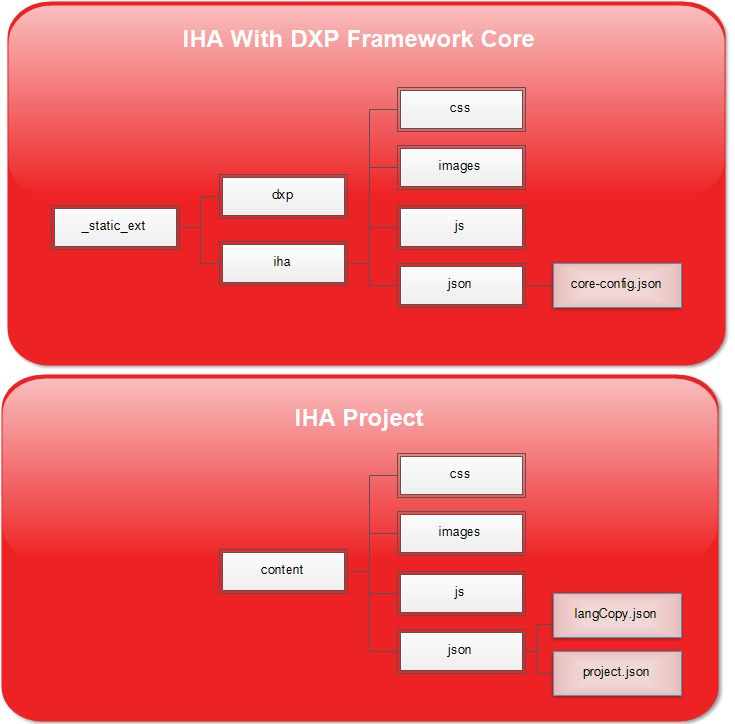
IHA Framework Core
This is the IHA framework core files. These files should not be altered.
- _static_ext - This is the folder containing all of the IHA framework core files.
- css - IHA component default styling.
- images - IHA default images
- js - IHA managers and services
- json - IHA JSON configuration
- core-config.json - This is the IHA core configuration file. That is merged to the DXP core-config.json then merged with the content project.json
IHA Project
This is where all of the project specific content is maintained.
- content - Project specific content
- css - Compiled SCSS files output to CSS
- images - Images
- js - This includes project.js which can be used to handle custom behavior.
- json - IHA JSON configuration
- langCopy.json - This is for the IHA language translations. This includes avatar animation closed captioning as well as interface content translations.
- project.json - This is the IHA project configuration file. When the core-config.json is loaded, this file's content will be merged using this file's configuration as priority to make up the master configuration.
project.json (Merged with core-config.json of the DXP and IHA)
This is the IHA project configuration file. The DXP has it's own core-config.json it is merged with the IHA core-config.json is loaded then, this file's content will be merged using this file's configuration as priority to make up the master configuration. DXP -> IHA -> Project
These are the primary nodes:
- map - Mapping services configuration.
- services - Services configurations for directories, Vimeo, Speech-to-text, email, sms, analytics, and versioning output.
- customProjectConfig - Custom defined project configuration settings.
- sendKeyEvents - Event string to animation intent mapping.
- proxySendkeyEvents - Event proxies used to trigger other events with their own animation intents defined in the sendKeyEvents.
- receiveKeyEvents - Animation intents to events mapping.
- document - Miscellaneous project configuration including classes, initial language, and hotkey configurations.
- iha - IHA specific element configurations.
- modules - The building blocks for the HTML scaffolding and event triggers.
map
Mapping services configuration.
- mappedin - Mappedin services configuration.
- config - Mappedin venue intialization configurations
- To disable Mappedin, set the venue to -1. Also remove the Mappedin script tag from the index.html file.
- url - This is the URL of the hosted web app.
- To disable Mappedin, set the venue to -1. Also remove the Mappedin script tag from the index.html file.
- isUsingSDK - Enables/Disables the use of running the Mappedin SDK internally. This is used to get venue and location data to assist in UX IHA services.
- containerId - HTML element ID for the container to hold the Mappedin SDK render. The default is set to sdkMapContainer.
- routeLocationSelections - This boolean is used to determine if a user navigates the map UI to a location and selects Directions that it defaults to directions from the starting location to the chosen location. The default is ##true##.
- startLocation - Starting location data (usually the Prsonas unit). Used for default directions to a selected location.
- There 2 levels of override to the starting location ID setting. This was put in place for the ability to easily change the location of the Prsonas unit when there are multiple units in the field using the same project. The first override is in the index.html file script tag at the bottom of the page using the data attribute data-mappedin-start-loc-id. The second override is used within the DXP BAT file adding the property map_prsonas_loc_id.
- avatarSpeech - These hooks are for enabling avatar responses to UI interactions with the map. If the user is selecting a location or getting directions, these properties would be used. [LOCATION_NAME] within the copy would be replaced by the location selected or the directions to.
- languageMapping - Language to avatar unit language code lookup
- config - Mappedin venue intialization configurations
iqueue
Configure iQueue services
- configCode - iQueue ID.
services
Services configurations for directories, Vimeo, Speech-to-text, email, sms, analytics, and versioning output.
-
webserviceUrl - Host service url.
-
emailService - Configuration for email service.
-
smsService - Configuration for SMS service.
-
analyticsService - Configuration for analytics service.
-
vimeo - Configuration for Vimeo services.
-
versioning - Key/Value pairs for displaying in the introduction modal versions of any useful tools.
customProjectConfig
Custom defined project configuration settings.
sendKeyEvents
Event string that is used to register events used in the modules and elsew here. Also to assign avatar animation intent mapping using key/value pairs.
proxySendkeyEvents
Event proxies used to trigger other events with their own animation intents defined in the sendKeyEvents. Defined using key/value pairs.
receiveKeyEvents
Animation intents to events mapping.
document
Miscellaneous project configuration including classes, initial language, and hotkey configurations.
- bodyClass - Body class
- constrainClass - Content class
- startEvent - Event triggered to begin the application upon initialization
- language - Active starting language
- hotkeys - Define hot key triggered events
iha
IHA specific element configurations.
-
map - Map template configuration
- qrCode - QR code diplay handling configuration
- type - This can be a "button" to toggle the QR code on and off, or "static" which keeps the QR code on at all times
- qrCode - QR code diplay handling configuration
-
timeBasedIntents - A look up used to configure an animation intent to trigger a different animation intent based on the time of day.
styles
Style configurations used to create style classes that can be used in the modules for building the project HTML. This includes fonts, colors for borders, text, and fill. This can also create custom classes based on the color styles.
modules
The building blocks for the HTML scaffolding and event triggers. Modules can be for entire pages and partials.
Here is an example of a page module:
"m-page-main-menu": {
		"id": "iha-template-page-menu",
		"class": "p-home",
		"event": "EVENT_PAGE_IHA_MAIN_MENU",
		"header": "",
		"footer": "",
		"title": {
		"copy": "I'm here to help.",
		"class": "l-title",
		"data": {
			"lang-copy-id": "home_title",
			"id": "title"
		}
	},
	"subtitle": {
		"copy": "Ask me a question or touch the screen.",
		"class": "l-subtitle",
		"data": {
			"lang-copy-id": "home_subtitle",
			"id": "subtitle"
		}
	},
	"buttons": [
		{
			"data": {
			"id": "findloc",
			"lang-copy-id": "home_findloc"
			},
			"copy": "Find a location",
			"event": "EVENT_PAGE_IHA_SEARCH_LOCATION"
		},

		{
			"data": {
			"id": "Taxi",
			"lang-copy-id": "home_booktaxi"
			},
			"copy": "Book a taxi",
			"event": "EVENT_PAGE_IHA_MAP"
		},

		{
			"data": {
			"id": "regbluebadge",
			"lang-copy-id": "home_regbluebadge"
			},
			"copy": "Register your Blue Badge",
			"event": "EVENT_PAGE_BLUE_BADGE"
		}
	]

	"modules": [
		{
			"id": "m-image",
			"class": "p-home__footer-icons",
			"src": "content/images/_English/home_footer-icons.png",
			"width": "983px",
			"height": "72px",
			"data": {
			"lang-img-id": "home_footer-icons.png"
			}
		}
	]
}
This is an example of a page IHA module for a main menu.
- m-page-main-menu is the name I gave to the name of the module.
- id in this case is using the predefined IHA template iha-template-page-menu. This determines which template this content will be applied to. In this case we know this is an IHA page that has a menu.
- class This is the class name that will be applied to the container hosting the content.
- header If you supply a module name here then that module will be injected into this one. This is useful when needing to apply common elements to multiple pages.
- footer If you supply a module name here then that module will be injected into this one. This is useful when needing to apply common elements to multiple pages.
- title Specific to this module, there is a title.
- copy - The copy to display in the title.
- class - The class to apply to this title element.
- data - This is an object using key/value pairs that creates data attributes on this element using "data-keyname" format.
- lang-copy-id - This is the data attribute that is used when applying multiple languages. This corresponding id would be in the langCopy.json and be applied to this element.
- subtitle Specific to this module, there is a subtitle.
- copy - The copy to display in the subtitle.
- class - The class to apply to this subtitle element.
- data - This is an object using key/value pairs that creates data attributes on this element using "data-keyname" format.
- lang-copy-id - This is the data attribute that is used when applying multiple languages. This corresponding id would be in the langCopy.json and be applied to this element.
- buttons Specific to this module, there is an array of button elements.
- data - This is an object using key/value pairs that creates data attributes on this element using "data-keyname" format.
- lang-copy-id - This is the data attribute that is used when applying multiple languages. This corresponding id would be in the langCopy.json and be applied to this element.
- copy - This is the copy to display.
- event - This is the event triggered when the button is pressed.
- data - This is an object using key/value pairs that creates data attributes on this element using "data-keyname" format.
- modules - This is an array of elements to be added to this page.
- In this example this is an image element module that is being added.
- Note the data attribute "lang-img-id", like 'lang-copy-id', This is the data attribute that is used when applying multiple languages. This corresponding id would be in the langCopy.json and be applied to this element by using the image in the corresponding language image folder.
Types Of Modules
Prsonas Basic Modules:
- m-button - Generic button with an event trigger
- m-div - Generic development
- m-form-checkbox - Form checkbox element
- m-form-input - Form input element
- m-form-radio - Form radio element
- m-form-select - Form select element
- m-form-textarea - Form textarea element
- m-form - Form container
- m-iframe - Iframe element
- m-image - Image element
- m-page - Page element
- m-string - String element
- m-video - Video element
IHA Specific Modules: Only available in IHA mode
-
iha-template-page-map - Mappedin page
-
iha-template-page-menu - Menu page
-
iha-template-page-search-location - Search location page
-
iha-template-page-static - Standard IHA page
-
iha-template-page-video-select - Select a video page
-
iha-template-page-presentation - Create a slideshow presentation with the ability to customize individual pages/slides
- Presentations are configured via a "presentation" property.
- Here is an example of the "presentation" property configuration:
"presentation": {
	"autoNav": true,
	"autoNavTransitionDelay": 15000,
	"pageCount": 10,
	"folder": "content/images/Pres1/",
	"filePrefix": "slide_",
	"pageConfig": {
		"slide_5": {
			"id": "m-string",
			"class": "slide5",
			"copy": "Just a reminder that this is slide 5"
		}
	}
}
-
iha-template-title - Module for title section typically displayed on every page.