
DXP Framework
v2.10.0000
The DXP framework is a module with the custom Prsonas framework using MVC structure pattern. It is designed as a working engine that uses a JSON configuration approach to building the page HTML scaffolding and navigation flow, then laid out via CSS.
DXP has prebuilt functional templates that include language selection and full integration with Prsonas SDK that manages Prsonas Avatar system using the DXP SDK. Where button and page events trigger animation sequences with speech-to-text handling using multi-language support. DXP provides functional templates that include animated language selection page and persistent animated return to language selection button that can be used across all pages.
The framework supports configurable language handling displaying the associated language copy through a language JSON file.
Other features include:
- Admin features to support various troubleshooting and avatar configuration needs.
- Configurable language handling displaying the associated language copy through a language JSON file and graphics through CSS.
- Automated UI language translation.
- Speech-to-text with full language support. This is then passed to Azure's Question Answering AI language services that consolidates question responses to an action context and an action id so it can be intelligently acted on.
Folder/File Structure
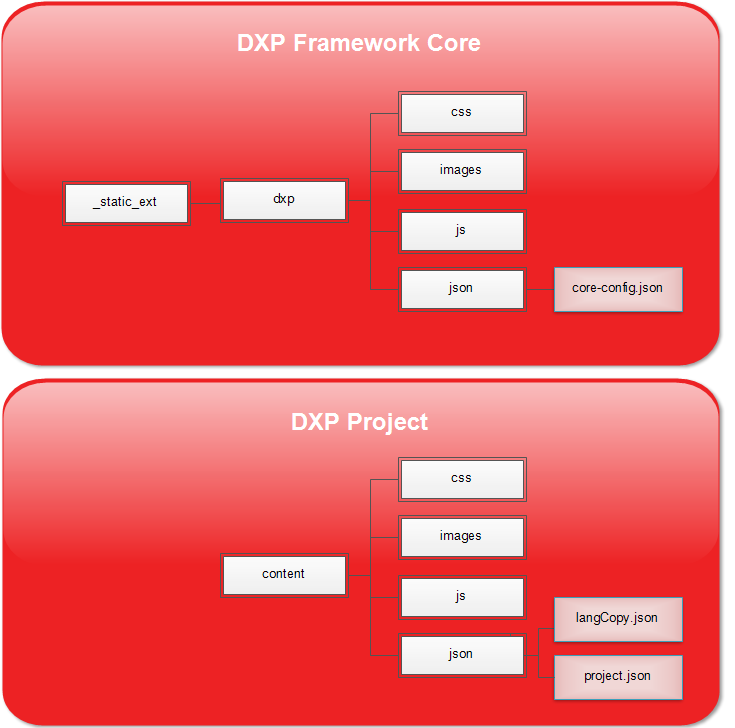
DXP Framework Core
This is DXP framework core files. These files should not be altered.
- _static_ext - This is the folder containing all of the DXP framework core files.
- css - Default CSS for core components
- images - DXP default images
- js - DXP managers and services
- json - DXP JSON configuration
- core-config.json - This is the DXP core configuration file.
DXP Project
This is where all of the project specific content is maintained.
- content - Project specific content
- css - Project specific CSS
- images - Images
- js - This includes project.js which can be used to handle custom behavior.
- json - DXP JSON configuration
- langCopy.json - This is for the DXP language translations. This includes avatar animation closed captioning as well as interface content translations.
- project.json - This is the DXP project configuration file. When the core-config.json is loaded, this file's content will be merged using this file's configuration as priority to make up the master configuration.
langCopy.json
This JSON file is for the DXP language translations. This includes avatar animation closed captioning as well as interface content translations. The automated language translation feature does not use this file.
languageCopy
languageCopy is the copy used for dynamic interface elements. These are identified in the interface elements by the data attribute "lang-copy-id". The string used within the data attribute of this element is used as the ID lookup here. Within that element in the JSON it uses key/value pairs where the key is the language and the value is the copy when that language is active.
There are number of framework defined interface elements that should remain.
* dxp_modal_qr_code
* dxp_no_internet_modal
* iha_expired_warning_countdown_1
* iha_expired_warning_countdown_2
* iha_expired_warning_continue
* iha_loading_modal
* iha-qr-btn
* iha-qr-callout
* global_mic-toggle
* global_home
* global_back
* language_title
* language_subtitle
* page_blank_title
project.json (Merged with core-config.json of the DXP)
This is the DXP project configuration file. When the core-config.json is loaded, this file's content will be merged using this file's configuration as priority to make up the master configuration.
These are the primary nodes:
- prsonas - Prsonas and timer specific configuration
- services - Services configurations for Speech-to-text, Q&A AI services, and versioning output
- language - Language id lookup
- speech - Speech handling configurations
- indicators - Client facing connection indicator configuration
- customProjectConfig - Custom defined project configuration settings.
- sendKeyEvents - Event string to animation intent mapping
- proxySendkeyEvents - Event proxies used to trigger other events with their own animation intents defined in the sendKeyEvents
- receiveKeyEvents - Animation intents to events mapping
- document - Miscellaneous project configuration including classes, initial language, and hotkey configurations
- styles - Style configurations used to create style classes that can be used in the modules for building the project HTML.
- modules - The building blocks for the HTML scaffolding and event triggers.
prsonas
Prsonas and timer specific configuration.
- version - Version of Prsonas framework hosting DXP
- adminPassword - Password to access admin panel.
- timers - Various timer settings. Times are in milliseconds.
- interaction - Timer for timeout trigger resulting from no speech or screen interaction.
- minInteractTime - Minimum interation time for experience to be logged.
- internetStatusCheckInterval - Time between interval checks for internet connection
- speechStatusCheckInterval - Time between interval checks for speech in progress
- interactionDelay - Forced delay between interactions to prevent rapid clicking.
- expiredEvent - Event string called when interation timer expires. It is strongly recommended that this event is unique to prevent unforseen conflicts.
services
Services configuration.
- speechToText - Configuration for speech-to-text service.
- qaSpokenActions - This is used for configuring the Knowledge Base output of a spoken response metadata action_ux beyond the default behaviors. The syntax for the metadata within the Knowledge Base associated with action_ux would be context_actionId. Then to configure this in the JSON, under qaSpokenActions would be the context key, the value would be the event string to be called. Other custom context properties may be added.
- navigation context is for general page navigation. Defaults include navigation_home will trigger the EVENT_PAGE_HOME_BTN event, navigation_back will trigger the EVENT_PAGE_BACK_BTN event.
- page context is for general page navigation.
- language General language configuration.
- languageRotation - Properties to help control the layout for the persistant "Choose your language" animated rotation of the languages that appear on pages outside of the language selection page.
- nuBrowserIds language mapping from interface readable value to Viewer language code.
- versioning - Key/Value pairs for displaying in the introduction modal versions of any useful tools.
language
Language id lookup.
speech
Language id lookup.
- speech - Interaction panel configuration
- listeningIntent - Intent triggered when avatar's listening state is enabled. An empty string will disable this.
- listeningIntentExceptionModules - This is an array of Strings. These Strings are the modules defined in the project.json modules object. These are the modules that will be exempt from using the listeningIntent.
- isSpeachEnabled - Enable/Disable speech-to-text.
- showMicToggle - Enable/Disable microphone toggle panel.
- spokenPanel - Configures position and animation for the spoken panel
- ccPanel - Configures position and animation for the closed caption panel
- animation - Panel animation config.
indicators
Client facing connection indicator configuration.
- showPersistantIndicators - Enables/Disables persistant icon indicators
- enableVerboseMessages - Enables/Disables verbose indicators
- messages - Messages provided when warning is triggered.
project.js
This is the file that is used if you want to have custom functionality not available in the framework.
customProjectConfig
Custom defined project configuration settings. This is simply an empty object that can be used for any configuration data that may be used for custom functionality that you build into project.js.
sendKeyEvents
Event string that is used to register events used in the modules and elsew here. Also to assign avatar animation intent mapping using key/value pairs.
proxySendkeyEvents
Event proxies used to trigger other events with their own animation intents defined in the sendKeyEvents. Defined using key/value pairs.
receiveKeyEvents
Animation intents to events mapping.
document
Miscellaneous project configuration including classes, initial language, and hotkey configurations.
- bodyClass - Body class
- constrainClass - Content class
- startEvent - Event triggered to begin the application upon initialization
- language - Active starting language
- hotkeys - Define hot key triggered events
styles
Style configurations used to create style classes that can be used in the modules for building the project HTML. This includes fonts, colors for borders, text, and fill. This can also create custom classes based on the color styles.
modules
The building blocks for the HTML scaffolding and event triggers. Modules can be for entire pages and partials.
Here is an example of a language page module:
"m-page-languages": {
	"id": "complex-template-page-languages",
	"class": "",
	"event": "EVENT_PAGE_LANGUAGES",
	"header": "",
	"footer": "",
	"title": {
		"copy": "I'm here to help.",
		"class": "l-title",
		"data": {
			"id": "title"
		}
	},
	"subtitle": {
		"copy": "Ask me a question or touch the screen.",
		"class": "l-subtitle",
		"data": {
			"id": "subtitle"
		}
	},

	"languages": [
		{
			"copy": "English",
			"id": "_English",
			"isIcon": true,
			"data": {
				"id": "_English",
				"lang-copy-id": "lang-english-start"
			}

		},

		{
			"copy": "French",
			"id": "_French",
			"isIcon": true,
			"data": {
				"id": "_French",
				"lang-copy-id": "lang-french-start"
			}
		}
	],

	"config": {
		"duration": 1.5,
		"delay": 3
	},

	"chooseLanguageRotation": {
		"_English": "Choose your<br>language to begin",
		"_French": "Choisissez votre<br>langue pour commencer"
	}
}
This is an example of a page DXP module for a main menu.
- m-page-languages is the name I gave to the name of the module.
- id in this case is using the predefined DXP template complex-template-page-languages. This determines which template this content will be applied to. In this case we know this is an DXP page for selecting a language.
- event This is event that triggers this page to load.
- class This is the class name that will be applied to the container hosting the content.
- header If you supply a module name here then that module will be injected into this one. This is useful when needing to apply common elements to multiple pages.
- footer If you supply a module name here then that module will be injected into this one. This is useful when needing to apply common elements to multiple pages.
- title Specific to this module, there is a title.
- copy - The copy to display in the title.
- class - The class to apply to this title element.
- data - This is an object using key/value pairs that creates data attributes on this element using "data-keyname" format.
- lang-copy-id - This is the data attribute that is used when applying multiple languages. This corresponding id would be in the langCopy.json and be applied to this element.
- subtitle Specific to this module, there is a subtitle.
- copy - The copy to display in the subtitle.
- class - The class to apply to this subtitle element.
- data - This is an object using key/value pairs that creates data attributes on this element using "data-keyname" format.
- lang-copy-id - This is the data attribute that is used when applying multiple languages. This corresponding id would be in the langCopy.json and be applied to this element.
- languages Specific to this module, there is language setup.
- copy - This is the copy to display.
- id - Id of the language.
- isIcon - Toggles the use of the animated icon.
- data - This is an object using key/value pairs that creates data attributes on this element using "data-keyname" format.
- lang-copy-id - This is the data attribute that is used when applying multiple languages. This corresponding id would be in the langCopy.json and be applied to this element.
- config Configures the animation cycle.
- duration - Length of animation.
- delay - Delay between rotations.
- chooseLanguageRotation - This is an array of elements in the animation rotation
- Key/Value pair: Language ID: Copy in rotation
Types Of HTML Scaffolding Modules
Prsonas Basic Modules:
- m-button - Generic button with an event trigger
- m-div - Generic development
- m-form-checkbox - Form checkbox element
- m-form-input - Form input element
- m-form-radio - Form radio element
- m-form-select - Form select element
- m-form-textarea - Form textarea element
- m-form - Form container
- m-iframe - Iframe element
- m-image - Image element
- m-page - Page element
- m-string - String element
- m-video - Video element
Prsonas Complex Modules:
- complex-template-page-languages - language page configuration. Language options are animated and configurable.
- complex-template-persistent-languages - Persistent language bar appears on all pages. It is the navigation to take the user back to language selection page. The different languages loop in an animation stating "Choose a language" in each of the languages. The speed of rotation is configurable.
- complex-template-home-back-btn - Home and back button elements.
- complex-template-home-btn - Home button element.
- complex-template-interactive - Interactive panel that displays closed captioning bubble, spoken bubble, microphone toggle panel.